For UK solar installers
A postcode to a costed, compliant design — in seconds.
Type an address and SimpliPV auto-designs the whole system — roof, layout, inverter, battery, shade-aware stringing and price. Backed by real LiDAR shading, BS 7671 calcs and an MCS-ready handover pack. Then refine every panel by hand.
MCS · BS 7671 · G98 / G99 · EA LiDAR · PVGIS
One job, five tools — and a spreadsheet.
PV design today means a roof drawer, a string calculator, a CAD package for the single-line, a spreadsheet for cable calcs and yet another app for the paperwork. SimpliPV does the lot — starting from an address, in seconds — and keeps every figure traceable, the way a proper engineering tool should.
The accuracy moat
Shade measured from LiDAR — not a rented guess.
Most tools rent photogrammetry imagery with patchy UK coverage. SimpliPV ray-casts every roof against free, national Environment Agency LiDAR — the real horizon of trees and buildings — to produce an MCS-compliant sun-path diagram and shade factor for the handover pack, hour by hour through the year. It even tells vegetation from solid, and eases it by season.
- ✓1 m LiDAR, ~99% of England, free to use
- ✓MCS sun-path + shade factor for the handover pack
- ✓Feeds the yield and the string design directly
- ✓Ready for MIS 3002 v2 (mandatory June 2026)
Everything in one place
Built for the UK install, end to end.
Instant auto-design
Type an address and get a complete costed system in seconds — roof planes, panel layout, inverter, battery, stringing and price, ready to refine.
LiDAR MCS shading
Shade every roof against free national LiDAR — a sun-path diagram and MCS shade factor, not a rented photogrammetry guess.
Auto-stringing to BS 7671
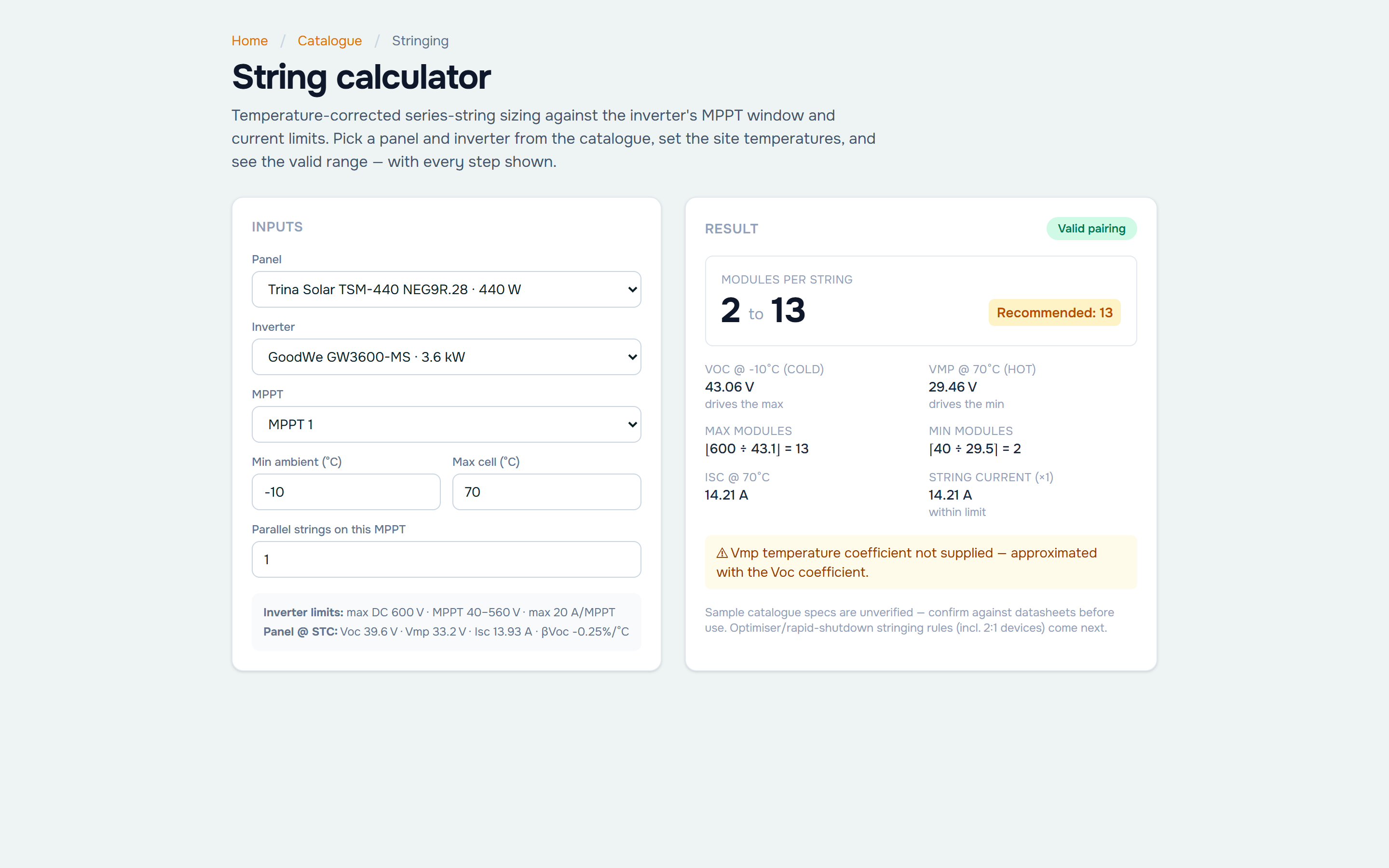
Temperature-corrected string sizing against the inverter's MPPT window and current limits, shade-aware — the maths shown, every time.
Editable single-line diagram
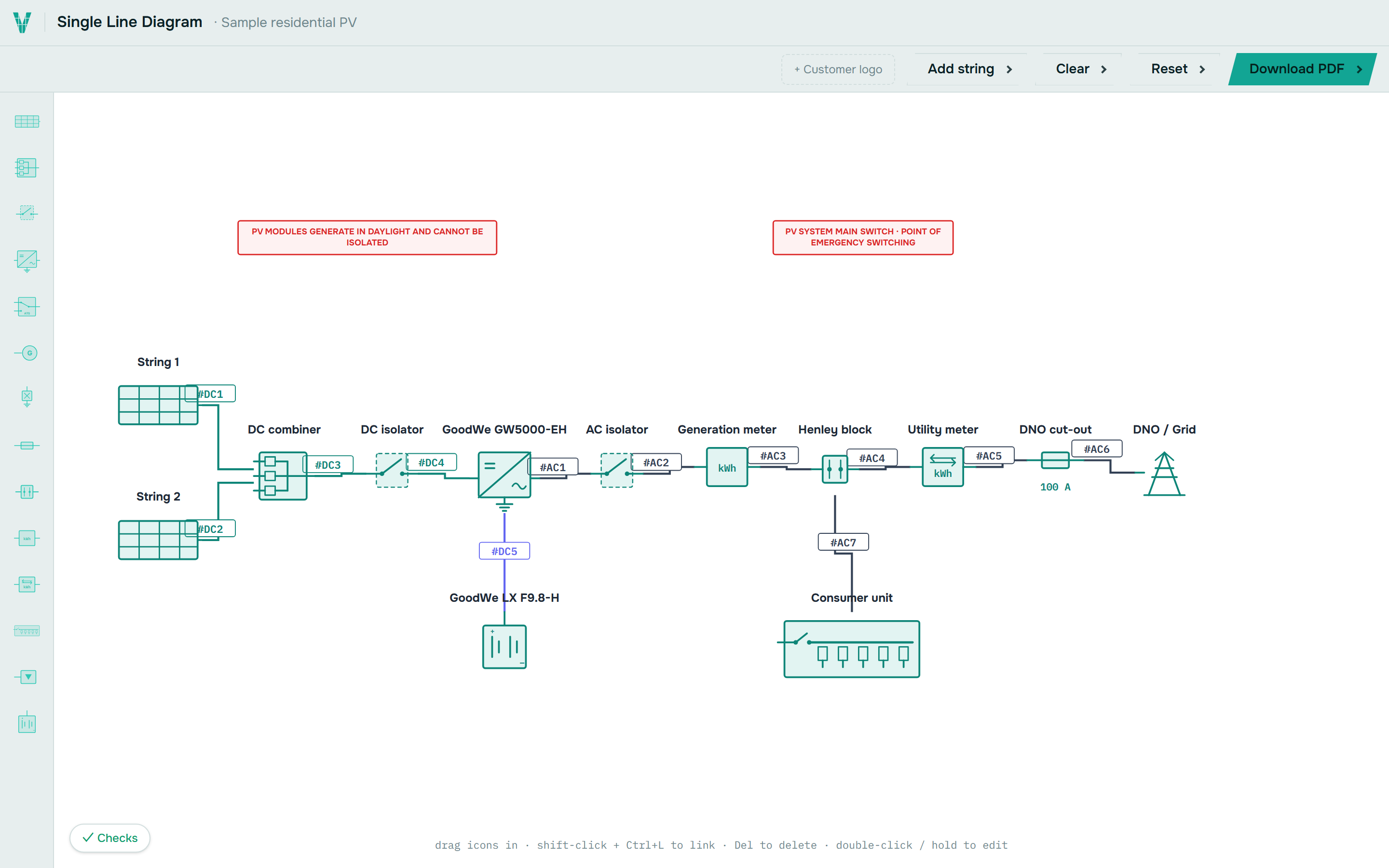
The only SLD that's genuinely drag-and-edit. Swap parts, label #AC/#DC cables, tag master/slave, export a drawing sheet.
BS 7671 cable calculations
Volt drop, current-carrying capacity with derating and protective-device sizing — auditable, not a black box.
Hourly per-module yield
8,760-hour generation from PVGIS weather with cell-temperature and near-shading — not a single specific-yield number.
LiDAR storeys → scaffold
Building height from LiDAR sets the storey count, so scaffold is costed from the real roof, not a flat assumption.
Terrace-boundary splitting
Continuous terrace and semi roofs are split to the target dwelling from its own property footprint.
Equipment catalogue
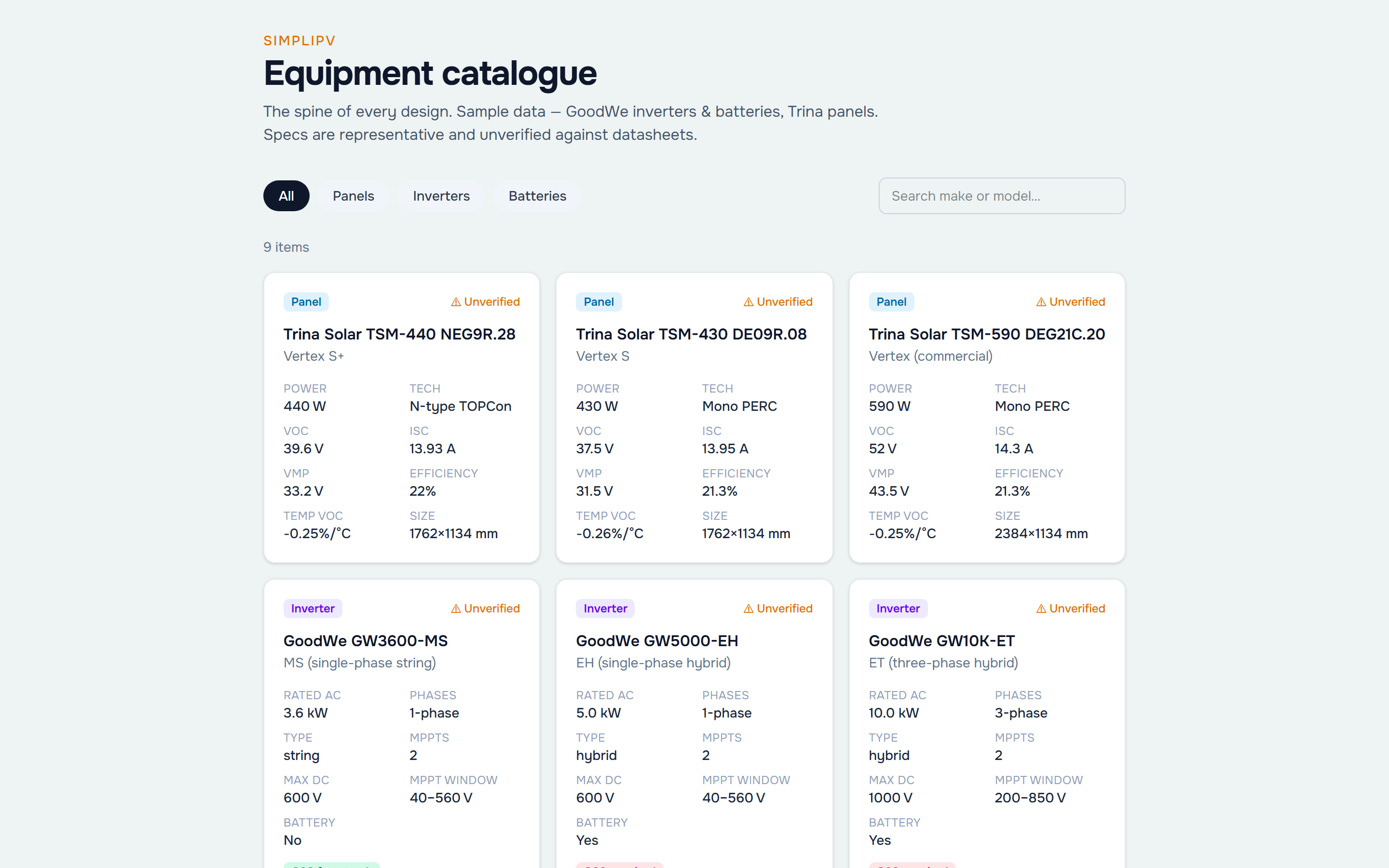
Modules with full electrical specs, MCS certification and ENA type-test references built in — panels, inverters and batteries.
MCS yield & G98 / G99
MCS-method generation and the right DNO connection route determined from the design automatically.
Proposals & handover
Client-ready proposals and MCS handover packs flow straight through — no re-keying, nothing missed.
Works on site
Desktop, tablet and mobile. Design in the van, present at the kitchen table, tweak on the roof.
See it in action
Real screens, not mockups.
Straight from the app. The editable single-line diagram, the equipment catalogue and the temperature-corrected string calculator — all live in the current preview.
One call, coordinates in
A whole-property design, staged and transparent.
Instant auto-design runs ten stages — each one shows its working, its confidence and any warnings. No black box: detect the building, reconstruct the roof, size to the occupant, pick the kit, model the generation, shade it, string it, cost the scaffold, price it, and assemble an editable design.
Our unfair advantage
A single-line diagram you can actually edit.
Most tools export a static PDF. SimpliPV gives you a live, editable SLD — drag components, auto-route and label cables (#AC / #DC), tag master & slave inverters, run the design checks, and export a proper drawing sheet with supplementary schedules.
Open the SLD editorThe workflow
Address to handover, one flow.
Enter the address
We fetch the roof, imagery and 3D.
Instant auto-design
A complete costed system in seconds.
Refine on the roof
Drag panels, tune the array, restring.
Shade, yield & checks
LiDAR shading, hourly yield, BS 7671.
Single-line & handover
Editable SLD + MCS pack.
Real UK product data
A catalogue that knows the paperwork.
Every design references a live catalogue built from the sources that matter in the UK — the MCS Product Directory for certification, the CEC lists for full electrical specs, and the ENA Connect Direct register for the exact G98/G99 type-test reference to cite on the DNO application.
Which modules are UK-certified — cert number + validity.
Voc, Isc, temp coeffs, dimensions — the full datasheet.
The Device System Reference for the DNO form.
Company margins, costs and product overrides.
How we stack up
Made for UK installers, not adapted for them.
| Capability | SimpliPV | OpenSolar | Aurora | EasyPV |
|---|---|---|---|---|
| Instant auto-design from an address | ✓ | ✓ | ✓ | ◑ |
| LiDAR shading (not rented imagery) | ✓ | – | ◑ | – |
| UK MCS-native workflow | ✓ | ◑ | – | ✓ |
| BS 7671 cable calcs | ✓ | – | – | ◑ |
| Editable single-line diagram | ✓ | – | ◑ | ◑ |
| Hourly / per-module yield | ✓ | ◑ | ✓ | – |
| Terrace-boundary splitting | ✓ | – | – | – |
| ENA type-test references | ✓ | – | – | ◑ |
| Proposals & handover packs | ✓ | ✓ | ◑ | ◑ |
✓ full · ◑ partial / add-on · – not really. Competitor names are trademarks of their owners; comparison is our honest read for a UK install workflow.
Questions
Good to know.
How does instant auto-design work?+
Enter an address and SimpliPV detects the building, reconstructs the roof planes, sizes the array, picks an inverter and battery, strings it, models the generation and prices it — a complete, editable first-pass design in seconds. Every stage shows its working and its confidence.
What makes the shading different?+
We ray-cast each roof against free 1 m Environment Agency LiDAR — the real horizon of trees and neighbouring buildings — rather than renting patchy photogrammetry imagery. That gives an MCS-compliant sun-path diagram and shade factor for the handover pack, and feeds the yield and string design.
Is SimpliPV built specifically for the UK?+
Yes. MCS and BS 7671 are baked in — string sizing, cable calcs, G98/G99 routing, the single-line and the catalogue (MCS certification + ENA type-test references) all follow UK practice, not a US template adapted after the fact.
Can I really edit the single-line diagram?+
Yes — it's fully drag-and-edit. Move components, auto-route and label cables, add isolators/SPDs/ATS, tag master & slave inverters, and export a drawing sheet with schedules. Try it from the top nav.
Does it work on a tablet on site?+
Yes. SimpliPV is designed for desktop, tablet and mobile so you can design in the van and present at the kitchen table.
When can I use it, and what does it cost?+
This is an early preview — the SLD editor is live to try now. Pricing is still being set; register for early access and we'll keep you posted.
Be first to design on SimpliPV.
Register your solar business for early access. We're building this with installers — tell us what your workflow needs.
Draft preview · catalogue seeded with 9 components